> ## Documentation Index
> Fetch the complete documentation index at: https://beta-guide.daro.so/llms.txt
> Use this file to discover all available pages before exploring further.
# Light Popup Ads
> Implement light popup ads with the DARO Flutter SDK.
## Light Popup Ad Format
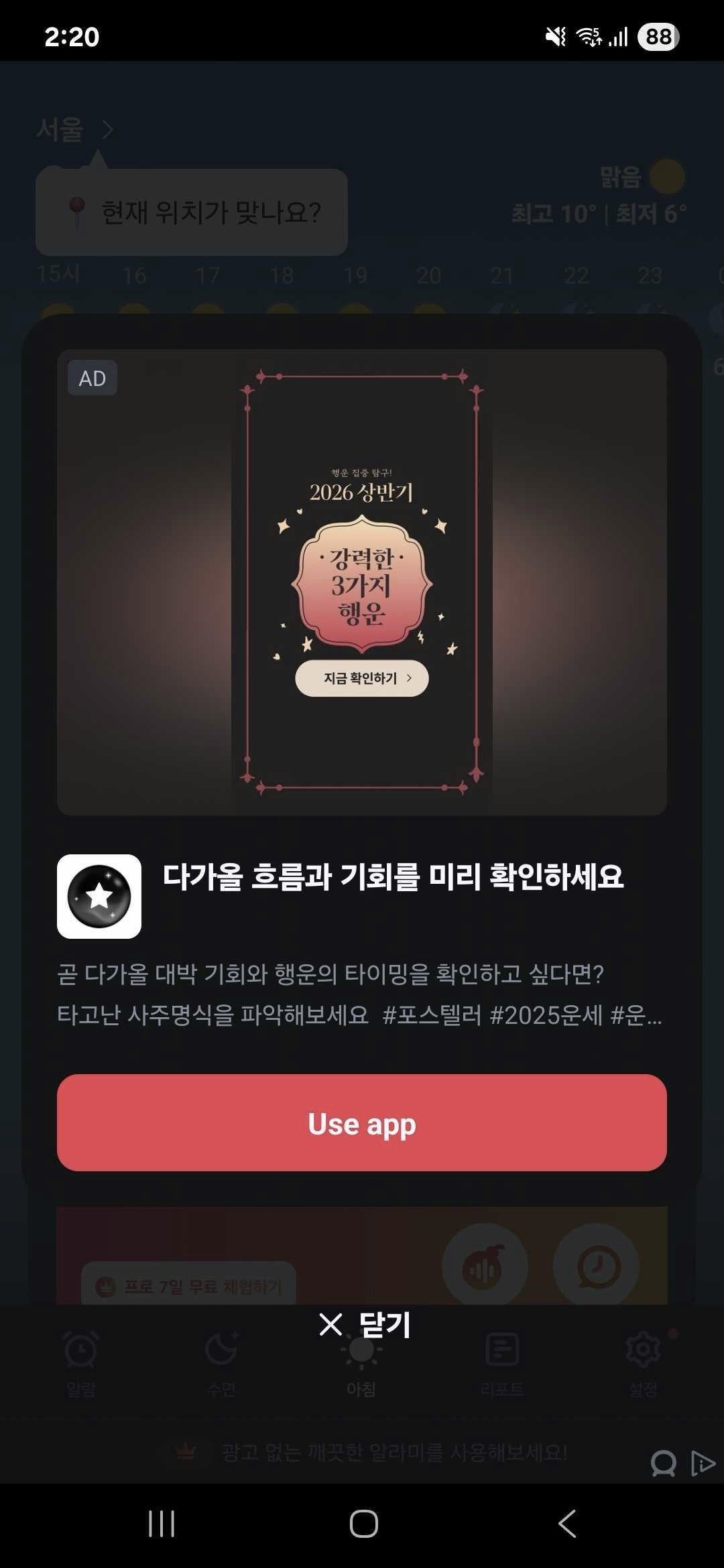
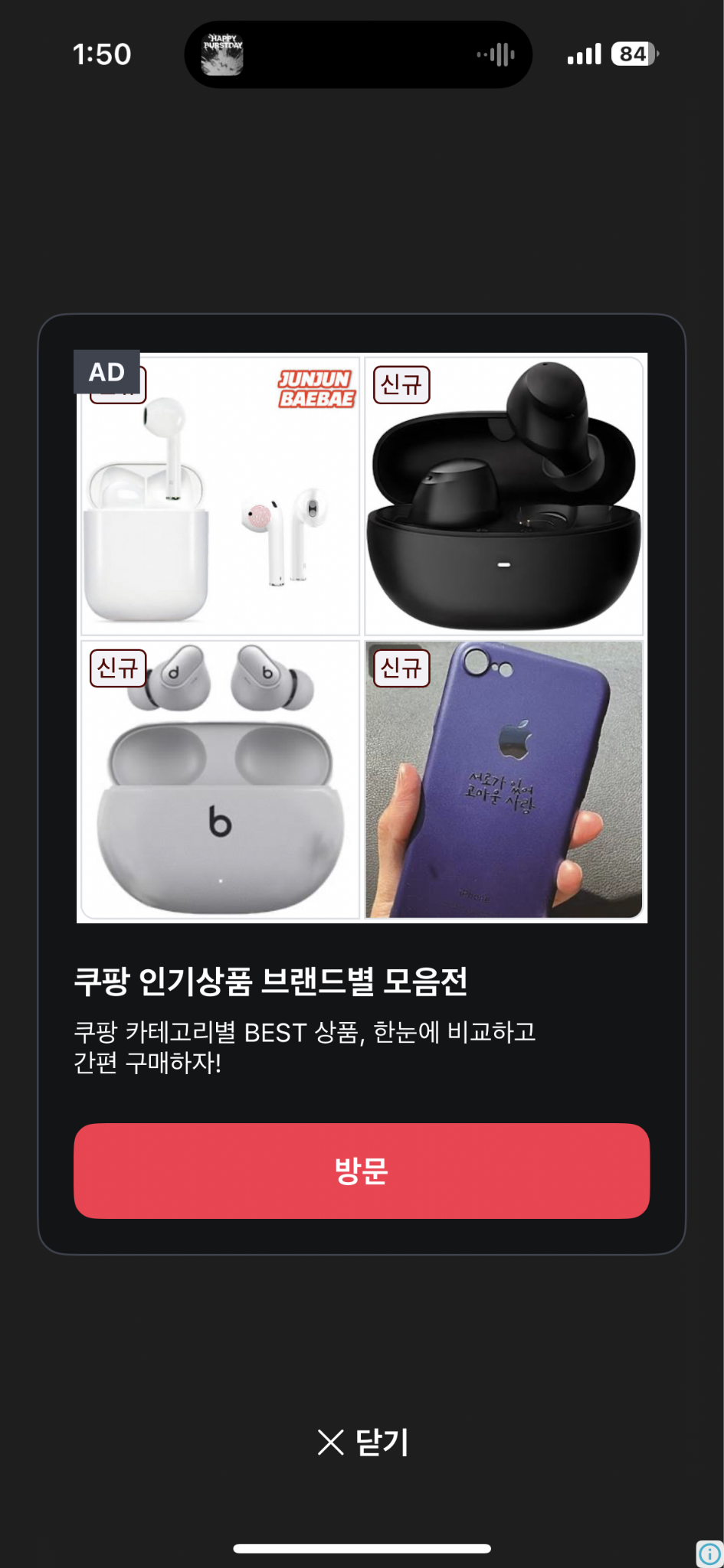
* A full-screen ad format.
* Automatically closes after 8 seconds. Less disruptive to UX compared to interstitial or rewarded video ads.
* Android light popup example
 * iOS light popup example
 ***
## Creating Instance and Setting Callbacks
Create a `DaroLightPopupAd` instance and set up callbacks.
```dart theme={null}
import 'package:daro_flutter/daro_flutter.dart';
```
```dart theme={null}
final lightPopupAd = DaroLightPopupAd(adUnitId: '{YOUR_AD_UNIT_ID}');
lightPopupAd.onAdLoadSuccess = (adInfo) {
print('LightPopup ad loaded');
};
lightPopupAd.onAdLoadFail = (error) {
print('LightPopup ad failed to load: ${error.message}');
};
lightPopupAd.onAdImpression = (adInfo) {
print('LightPopup ad impression');
};
lightPopupAd.onAdClicked = (adInfo) {
print('LightPopup ad clicked');
};
lightPopupAd.onAdShown = (adInfo) {
print('LightPopup ad shown');
};
lightPopupAd.onAdFailedToShow = (error) {
print('LightPopup ad failed to show: ${error.message}');
};
lightPopupAd.onAdDismiss = (adInfo) {
print('LightPopup ad dismissed');
};
```
## Loading Ads
Call `load()` to load an ad.
```dart theme={null}
lightPopupAd.load();
```
## Showing Ads
Check if the ad is ready with `isReady()`, then display it with `show()`.
```dart theme={null}
final isReady = await lightPopupAd.isReady();
if (isReady) {
lightPopupAd.show();
}
```
## Releasing Resources
Call `dispose()` to release resources when done.
```dart theme={null}
lightPopupAd.dispose();
```
***
## Style Customization
Use `DaroLightPopupStyle` to customize the UI of light popup ads. Pass Flutter `Color` objects directly.
```dart theme={null}
final lightPopupAd = DaroLightPopupAd(
adUnitId: '{YOUR_AD_UNIT_ID}',
style: DaroLightPopupStyle(
backgroundColor: const Color(0xB2121416), // Overall background color
containerColor: const Color(0xFF121416), // Card background color
titleColor: const Color(0xFFF7FAFF), // Title color
bodyColor: const Color(0xFFB6BECC), // Body text color
ctaBackgroundColor: const Color(0xFFEB2640), // CTA button background color
ctaTextColor: const Color(0xFFFFFFFF), // CTA button text color
closeButtonColor: const Color(0xFFF7FAFF), // Close button text color
closeButtonText: 'Close AD', // Close button text
adMarkLabelTextColor: const Color(0xFFF7FAFF), // Ad mark label text color
adMarkLabelBackgroundColor: const Color(0xFF3E434F), // Ad mark label background color
),
);
```
### Style Properties
| Property | Type | Description |
| ---------------------------- | --------- | ------------------------------ |
| `backgroundColor` | `Color?` | Overall background color |
| `containerColor` | `Color?` | Card background color |
| `titleColor` | `Color?` | Title color |
| `bodyColor` | `Color?` | Body text color |
| `ctaBackgroundColor` | `Color?` | CTA button background color |
| `ctaTextColor` | `Color?` | CTA button text color |
| `closeButtonColor` | `Color?` | Close button text color |
| `closeButtonText` | `String?` | Close button text |
| `adMarkLabelTextColor` | `Color?` | Ad mark label text color |
| `adMarkLabelBackgroundColor` | `Color?` | Ad mark label background color |
### Implementation Example
```dart theme={null}
import 'package:flutter/material.dart';
import 'package:daro_flutter/daro_flutter.dart';
class LightPopupAdPage extends StatefulWidget {
const LightPopupAdPage({super.key});
@override
State createState() => _LightPopupAdPageState();
}
class _LightPopupAdPageState extends State {
late final DaroLightPopupAd _lightPopupAd;
String _status = 'Not Loaded';
@override
void initState() {
super.initState();
_lightPopupAd = DaroLightPopupAd(
adUnitId: '{YOUR_AD_UNIT_ID}',
style: DaroLightPopupStyle(
backgroundColor: const Color(0xB2121416),
containerColor: const Color(0xFF121416),
titleColor: const Color(0xFFF7FAFF),
bodyColor: const Color(0xFFB6BECC),
ctaBackgroundColor: const Color(0xFFEB2640),
ctaTextColor: const Color(0xFFFFFFFF),
closeButtonColor: const Color(0xFFF7FAFF),
closeButtonText: 'Close AD',
adMarkLabelTextColor: const Color(0xFFF7FAFF),
adMarkLabelBackgroundColor: const Color(0xFF3E434F),
),
);
_setupCallbacks();
}
void _setupCallbacks() {
_lightPopupAd.onAdLoadSuccess = (adInfo) {
setState(() => _status = 'Loaded');
};
_lightPopupAd.onAdLoadFail = (error) {
setState(() => _status = 'Failed to Load');
print('LightPopup ad failed to load: ${error.message}');
};
_lightPopupAd.onAdShown = (adInfo) {
setState(() => _status = 'Shown');
};
_lightPopupAd.onAdFailedToShow = (error) {
setState(() => _status = 'Failed to Show');
};
_lightPopupAd.onAdDismiss = (adInfo) {
setState(() => _status = 'Not Loaded');
};
_lightPopupAd.onAdClicked = (adInfo) {
print('LightPopup ad clicked');
};
_lightPopupAd.onAdImpression = (adInfo) {
print('LightPopup ad impression');
};
}
@override
void dispose() {
_lightPopupAd.dispose();
super.dispose();
}
@override
Widget build(BuildContext context) {
return Scaffold(
appBar: AppBar(title: const Text('Light Popup Ad')),
body: Center(
child: Column(
mainAxisAlignment: MainAxisAlignment.center,
children: [
Text('Status: $_status'),
const SizedBox(height: 16),
ElevatedButton(
onPressed: () async {
final isReady = await _lightPopupAd.isReady();
if (isReady) {
_lightPopupAd.show();
} else {
setState(() => _status = 'Loading...');
_lightPopupAd.load();
}
},
child: Text(_status == 'Loaded' ? 'Show LightPopup' : 'Load LightPopup'),
),
],
),
),
);
}
}
```
***
## Creating Instance and Setting Callbacks
Create a `DaroLightPopupAd` instance and set up callbacks.
```dart theme={null}
import 'package:daro_flutter/daro_flutter.dart';
```
```dart theme={null}
final lightPopupAd = DaroLightPopupAd(adUnitId: '{YOUR_AD_UNIT_ID}');
lightPopupAd.onAdLoadSuccess = (adInfo) {
print('LightPopup ad loaded');
};
lightPopupAd.onAdLoadFail = (error) {
print('LightPopup ad failed to load: ${error.message}');
};
lightPopupAd.onAdImpression = (adInfo) {
print('LightPopup ad impression');
};
lightPopupAd.onAdClicked = (adInfo) {
print('LightPopup ad clicked');
};
lightPopupAd.onAdShown = (adInfo) {
print('LightPopup ad shown');
};
lightPopupAd.onAdFailedToShow = (error) {
print('LightPopup ad failed to show: ${error.message}');
};
lightPopupAd.onAdDismiss = (adInfo) {
print('LightPopup ad dismissed');
};
```
## Loading Ads
Call `load()` to load an ad.
```dart theme={null}
lightPopupAd.load();
```
## Showing Ads
Check if the ad is ready with `isReady()`, then display it with `show()`.
```dart theme={null}
final isReady = await lightPopupAd.isReady();
if (isReady) {
lightPopupAd.show();
}
```
## Releasing Resources
Call `dispose()` to release resources when done.
```dart theme={null}
lightPopupAd.dispose();
```
***
## Style Customization
Use `DaroLightPopupStyle` to customize the UI of light popup ads. Pass Flutter `Color` objects directly.
```dart theme={null}
final lightPopupAd = DaroLightPopupAd(
adUnitId: '{YOUR_AD_UNIT_ID}',
style: DaroLightPopupStyle(
backgroundColor: const Color(0xB2121416), // Overall background color
containerColor: const Color(0xFF121416), // Card background color
titleColor: const Color(0xFFF7FAFF), // Title color
bodyColor: const Color(0xFFB6BECC), // Body text color
ctaBackgroundColor: const Color(0xFFEB2640), // CTA button background color
ctaTextColor: const Color(0xFFFFFFFF), // CTA button text color
closeButtonColor: const Color(0xFFF7FAFF), // Close button text color
closeButtonText: 'Close AD', // Close button text
adMarkLabelTextColor: const Color(0xFFF7FAFF), // Ad mark label text color
adMarkLabelBackgroundColor: const Color(0xFF3E434F), // Ad mark label background color
),
);
```
### Style Properties
| Property | Type | Description |
| ---------------------------- | --------- | ------------------------------ |
| `backgroundColor` | `Color?` | Overall background color |
| `containerColor` | `Color?` | Card background color |
| `titleColor` | `Color?` | Title color |
| `bodyColor` | `Color?` | Body text color |
| `ctaBackgroundColor` | `Color?` | CTA button background color |
| `ctaTextColor` | `Color?` | CTA button text color |
| `closeButtonColor` | `Color?` | Close button text color |
| `closeButtonText` | `String?` | Close button text |
| `adMarkLabelTextColor` | `Color?` | Ad mark label text color |
| `adMarkLabelBackgroundColor` | `Color?` | Ad mark label background color |
### Implementation Example
```dart theme={null}
import 'package:flutter/material.dart';
import 'package:daro_flutter/daro_flutter.dart';
class LightPopupAdPage extends StatefulWidget {
const LightPopupAdPage({super.key});
@override
State createState() => _LightPopupAdPageState();
}
class _LightPopupAdPageState extends State {
late final DaroLightPopupAd _lightPopupAd;
String _status = 'Not Loaded';
@override
void initState() {
super.initState();
_lightPopupAd = DaroLightPopupAd(
adUnitId: '{YOUR_AD_UNIT_ID}',
style: DaroLightPopupStyle(
backgroundColor: const Color(0xB2121416),
containerColor: const Color(0xFF121416),
titleColor: const Color(0xFFF7FAFF),
bodyColor: const Color(0xFFB6BECC),
ctaBackgroundColor: const Color(0xFFEB2640),
ctaTextColor: const Color(0xFFFFFFFF),
closeButtonColor: const Color(0xFFF7FAFF),
closeButtonText: 'Close AD',
adMarkLabelTextColor: const Color(0xFFF7FAFF),
adMarkLabelBackgroundColor: const Color(0xFF3E434F),
),
);
_setupCallbacks();
}
void _setupCallbacks() {
_lightPopupAd.onAdLoadSuccess = (adInfo) {
setState(() => _status = 'Loaded');
};
_lightPopupAd.onAdLoadFail = (error) {
setState(() => _status = 'Failed to Load');
print('LightPopup ad failed to load: ${error.message}');
};
_lightPopupAd.onAdShown = (adInfo) {
setState(() => _status = 'Shown');
};
_lightPopupAd.onAdFailedToShow = (error) {
setState(() => _status = 'Failed to Show');
};
_lightPopupAd.onAdDismiss = (adInfo) {
setState(() => _status = 'Not Loaded');
};
_lightPopupAd.onAdClicked = (adInfo) {
print('LightPopup ad clicked');
};
_lightPopupAd.onAdImpression = (adInfo) {
print('LightPopup ad impression');
};
}
@override
void dispose() {
_lightPopupAd.dispose();
super.dispose();
}
@override
Widget build(BuildContext context) {
return Scaffold(
appBar: AppBar(title: const Text('Light Popup Ad')),
body: Center(
child: Column(
mainAxisAlignment: MainAxisAlignment.center,
children: [
Text('Status: $_status'),
const SizedBox(height: 16),
ElevatedButton(
onPressed: () async {
final isReady = await _lightPopupAd.isReady();
if (isReady) {
_lightPopupAd.show();
} else {
setState(() => _status = 'Loading...');
_lightPopupAd.load();
}
},
child: Text(_status == 'Loaded' ? 'Show LightPopup' : 'Load LightPopup'),
),
],
),
),
);
}
}
```