> ## Documentation Index
> Fetch the complete documentation index at: https://beta-guide.daro.so/llms.txt
> Use this file to discover all available pages before exploring further.
# 라이트 팝업 광고
> DARO Flutter SDK를 통해 라이트 팝업 광고를 구현하는 방법을 알아봅니다.
## 라이트 팝업 광고 형태 소개
* 전면 광고 유형입니다.
* 8초 후에 자동으로 닫히게 됩니다. 인터스티셜이나, 리워드 비디오보다 UX를 해치지 않고 광고를 보여줄 수 있습니다.
* Android 라이트팝업 예시
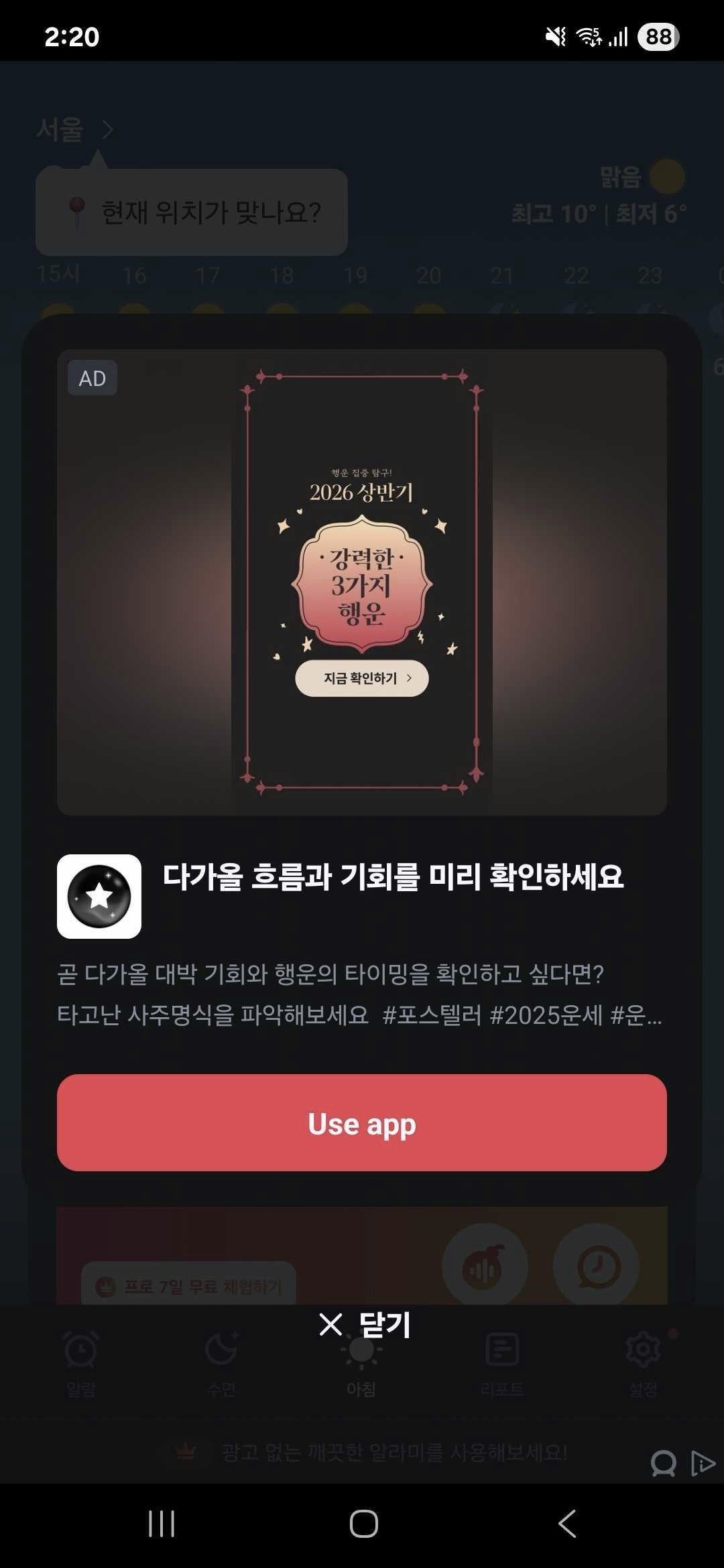 * iOS 라이트팝업 예시
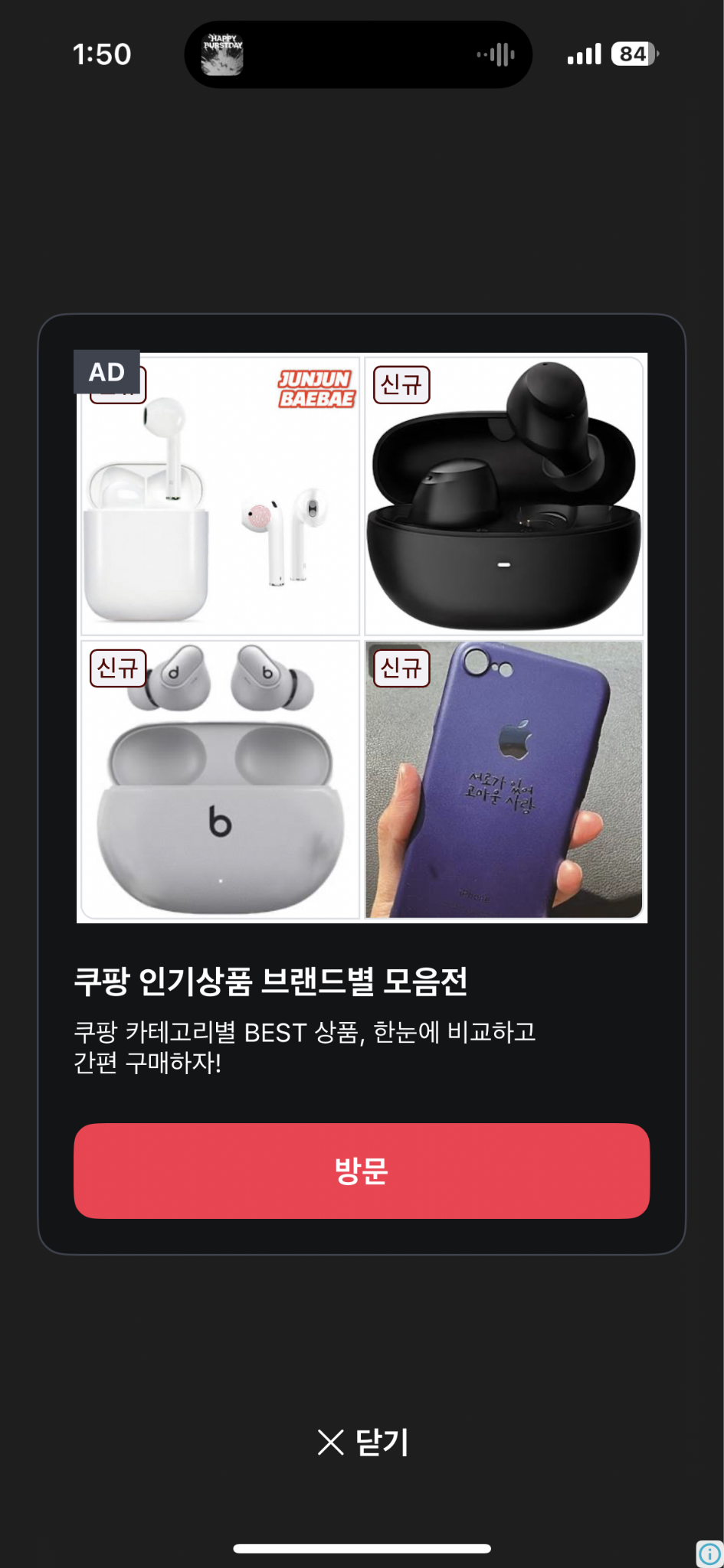 ***
## 인스턴스 생성 및 콜백 설정
`DaroLightPopupAd` 인스턴스를 생성하고 콜백을 설정합니다.
```dart theme={null}
import 'package:daro_flutter/daro_flutter.dart';
```
```dart theme={null}
final lightPopupAd = DaroLightPopupAd(adUnitId: '{YOUR_AD_UNIT_ID}');
lightPopupAd.onAdLoadSuccess = (adInfo) {
print('LightPopup ad loaded');
};
lightPopupAd.onAdLoadFail = (error) {
print('LightPopup ad failed to load: ${error.message}');
};
lightPopupAd.onAdImpression = (adInfo) {
print('LightPopup ad impression');
};
lightPopupAd.onAdClicked = (adInfo) {
print('LightPopup ad clicked');
};
lightPopupAd.onAdShown = (adInfo) {
print('LightPopup ad shown');
};
lightPopupAd.onAdFailedToShow = (error) {
print('LightPopup ad failed to show: ${error.message}');
};
lightPopupAd.onAdDismiss = (adInfo) {
print('LightPopup ad dismissed');
};
```
## 광고 로드하기
`load()`를 호출하여 광고를 로드합니다.
```dart theme={null}
lightPopupAd.load();
```
## 광고 보여주기
`isReady()`로 광고 준비 여부를 확인한 후 `show()`로 광고를 표시합니다.
```dart theme={null}
final isReady = await lightPopupAd.isReady();
if (isReady) {
lightPopupAd.show();
}
```
## 리소스 해제
광고 사용이 끝나면 `dispose()`를 호출하여 리소스를 해제합니다.
```dart theme={null}
lightPopupAd.dispose();
```
***
## 광고 커스터마이징
`DaroLightPopupStyle`을 사용하여 라이트 팝업 광고의 UI를 커스터마이징할 수 있습니다. Flutter의 `Color` 객체를 직접 전달합니다.
```dart theme={null}
final lightPopupAd = DaroLightPopupAd(
adUnitId: '{YOUR_AD_UNIT_ID}',
style: DaroLightPopupStyle(
backgroundColor: const Color(0xB2121416), // 전체 배경색
containerColor: const Color(0xFF121416), // 카드 배경색
titleColor: const Color(0xFFF7FAFF), // 타이틀 색상
bodyColor: const Color(0xFFB6BECC), // 본문 색상
ctaBackgroundColor: const Color(0xFFEB2640), // CTA 버튼 배경색
ctaTextColor: const Color(0xFFFFFFFF), // CTA 버튼 텍스트 색상
closeButtonColor: const Color(0xFFF7FAFF), // 닫기 버튼 텍스트 색상
closeButtonText: 'Close AD', // 닫기 버튼 텍스트
adMarkLabelTextColor: const Color(0xFFF7FAFF), // 광고 마크 텍스트 색상
adMarkLabelBackgroundColor: const Color(0xFF3E434F), // 광고 마크 배경색
),
);
```
### 스타일 속성
| 속성 | 타입 | 설명 |
| ---------------------------- | --------- | ------------- |
| `backgroundColor` | `Color?` | 전체 배경색 |
| `containerColor` | `Color?` | 카드 배경색 |
| `titleColor` | `Color?` | 타이틀 색상 |
| `bodyColor` | `Color?` | 본문 색상 |
| `ctaBackgroundColor` | `Color?` | CTA 버튼 배경색 |
| `ctaTextColor` | `Color?` | CTA 버튼 텍스트 색상 |
| `closeButtonColor` | `Color?` | 닫기 버튼 텍스트 색상 |
| `closeButtonText` | `String?` | 닫기 버튼 텍스트 |
| `adMarkLabelTextColor` | `Color?` | 광고 마크 텍스트 색상 |
| `adMarkLabelBackgroundColor` | `Color?` | 광고 마크 배경색 |
### 구현 예시
```dart theme={null}
import 'package:flutter/material.dart';
import 'package:daro_flutter/daro_flutter.dart';
class LightPopupAdPage extends StatefulWidget {
const LightPopupAdPage({super.key});
@override
State createState() => _LightPopupAdPageState();
}
class _LightPopupAdPageState extends State {
late final DaroLightPopupAd _lightPopupAd;
String _status = 'Not Loaded';
@override
void initState() {
super.initState();
_lightPopupAd = DaroLightPopupAd(
adUnitId: '{YOUR_AD_UNIT_ID}',
style: DaroLightPopupStyle(
backgroundColor: const Color(0xB2121416),
containerColor: const Color(0xFF121416),
titleColor: const Color(0xFFF7FAFF),
bodyColor: const Color(0xFFB6BECC),
ctaBackgroundColor: const Color(0xFFEB2640),
ctaTextColor: const Color(0xFFFFFFFF),
closeButtonColor: const Color(0xFFF7FAFF),
closeButtonText: 'Close AD',
adMarkLabelTextColor: const Color(0xFFF7FAFF),
adMarkLabelBackgroundColor: const Color(0xFF3E434F),
),
);
_setupCallbacks();
}
void _setupCallbacks() {
_lightPopupAd.onAdLoadSuccess = (adInfo) {
setState(() => _status = 'Loaded');
};
_lightPopupAd.onAdLoadFail = (error) {
setState(() => _status = 'Failed to Load');
print('LightPopup ad failed to load: ${error.message}');
};
_lightPopupAd.onAdShown = (adInfo) {
setState(() => _status = 'Shown');
};
_lightPopupAd.onAdFailedToShow = (error) {
setState(() => _status = 'Failed to Show');
};
_lightPopupAd.onAdDismiss = (adInfo) {
setState(() => _status = 'Not Loaded');
};
_lightPopupAd.onAdClicked = (adInfo) {
print('LightPopup ad clicked');
};
_lightPopupAd.onAdImpression = (adInfo) {
print('LightPopup ad impression');
};
}
@override
void dispose() {
_lightPopupAd.dispose();
super.dispose();
}
@override
Widget build(BuildContext context) {
return Scaffold(
appBar: AppBar(title: const Text('Light Popup Ad')),
body: Center(
child: Column(
mainAxisAlignment: MainAxisAlignment.center,
children: [
Text('Status: $_status'),
const SizedBox(height: 16),
ElevatedButton(
onPressed: () async {
final isReady = await _lightPopupAd.isReady();
if (isReady) {
_lightPopupAd.show();
} else {
setState(() => _status = 'Loading...');
_lightPopupAd.load();
}
},
child: Text(_status == 'Loaded' ? 'Show LightPopup' : 'Load LightPopup'),
),
],
),
),
);
}
}
```
***
## 인스턴스 생성 및 콜백 설정
`DaroLightPopupAd` 인스턴스를 생성하고 콜백을 설정합니다.
```dart theme={null}
import 'package:daro_flutter/daro_flutter.dart';
```
```dart theme={null}
final lightPopupAd = DaroLightPopupAd(adUnitId: '{YOUR_AD_UNIT_ID}');
lightPopupAd.onAdLoadSuccess = (adInfo) {
print('LightPopup ad loaded');
};
lightPopupAd.onAdLoadFail = (error) {
print('LightPopup ad failed to load: ${error.message}');
};
lightPopupAd.onAdImpression = (adInfo) {
print('LightPopup ad impression');
};
lightPopupAd.onAdClicked = (adInfo) {
print('LightPopup ad clicked');
};
lightPopupAd.onAdShown = (adInfo) {
print('LightPopup ad shown');
};
lightPopupAd.onAdFailedToShow = (error) {
print('LightPopup ad failed to show: ${error.message}');
};
lightPopupAd.onAdDismiss = (adInfo) {
print('LightPopup ad dismissed');
};
```
## 광고 로드하기
`load()`를 호출하여 광고를 로드합니다.
```dart theme={null}
lightPopupAd.load();
```
## 광고 보여주기
`isReady()`로 광고 준비 여부를 확인한 후 `show()`로 광고를 표시합니다.
```dart theme={null}
final isReady = await lightPopupAd.isReady();
if (isReady) {
lightPopupAd.show();
}
```
## 리소스 해제
광고 사용이 끝나면 `dispose()`를 호출하여 리소스를 해제합니다.
```dart theme={null}
lightPopupAd.dispose();
```
***
## 광고 커스터마이징
`DaroLightPopupStyle`을 사용하여 라이트 팝업 광고의 UI를 커스터마이징할 수 있습니다. Flutter의 `Color` 객체를 직접 전달합니다.
```dart theme={null}
final lightPopupAd = DaroLightPopupAd(
adUnitId: '{YOUR_AD_UNIT_ID}',
style: DaroLightPopupStyle(
backgroundColor: const Color(0xB2121416), // 전체 배경색
containerColor: const Color(0xFF121416), // 카드 배경색
titleColor: const Color(0xFFF7FAFF), // 타이틀 색상
bodyColor: const Color(0xFFB6BECC), // 본문 색상
ctaBackgroundColor: const Color(0xFFEB2640), // CTA 버튼 배경색
ctaTextColor: const Color(0xFFFFFFFF), // CTA 버튼 텍스트 색상
closeButtonColor: const Color(0xFFF7FAFF), // 닫기 버튼 텍스트 색상
closeButtonText: 'Close AD', // 닫기 버튼 텍스트
adMarkLabelTextColor: const Color(0xFFF7FAFF), // 광고 마크 텍스트 색상
adMarkLabelBackgroundColor: const Color(0xFF3E434F), // 광고 마크 배경색
),
);
```
### 스타일 속성
| 속성 | 타입 | 설명 |
| ---------------------------- | --------- | ------------- |
| `backgroundColor` | `Color?` | 전체 배경색 |
| `containerColor` | `Color?` | 카드 배경색 |
| `titleColor` | `Color?` | 타이틀 색상 |
| `bodyColor` | `Color?` | 본문 색상 |
| `ctaBackgroundColor` | `Color?` | CTA 버튼 배경색 |
| `ctaTextColor` | `Color?` | CTA 버튼 텍스트 색상 |
| `closeButtonColor` | `Color?` | 닫기 버튼 텍스트 색상 |
| `closeButtonText` | `String?` | 닫기 버튼 텍스트 |
| `adMarkLabelTextColor` | `Color?` | 광고 마크 텍스트 색상 |
| `adMarkLabelBackgroundColor` | `Color?` | 광고 마크 배경색 |
### 구현 예시
```dart theme={null}
import 'package:flutter/material.dart';
import 'package:daro_flutter/daro_flutter.dart';
class LightPopupAdPage extends StatefulWidget {
const LightPopupAdPage({super.key});
@override
State createState() => _LightPopupAdPageState();
}
class _LightPopupAdPageState extends State {
late final DaroLightPopupAd _lightPopupAd;
String _status = 'Not Loaded';
@override
void initState() {
super.initState();
_lightPopupAd = DaroLightPopupAd(
adUnitId: '{YOUR_AD_UNIT_ID}',
style: DaroLightPopupStyle(
backgroundColor: const Color(0xB2121416),
containerColor: const Color(0xFF121416),
titleColor: const Color(0xFFF7FAFF),
bodyColor: const Color(0xFFB6BECC),
ctaBackgroundColor: const Color(0xFFEB2640),
ctaTextColor: const Color(0xFFFFFFFF),
closeButtonColor: const Color(0xFFF7FAFF),
closeButtonText: 'Close AD',
adMarkLabelTextColor: const Color(0xFFF7FAFF),
adMarkLabelBackgroundColor: const Color(0xFF3E434F),
),
);
_setupCallbacks();
}
void _setupCallbacks() {
_lightPopupAd.onAdLoadSuccess = (adInfo) {
setState(() => _status = 'Loaded');
};
_lightPopupAd.onAdLoadFail = (error) {
setState(() => _status = 'Failed to Load');
print('LightPopup ad failed to load: ${error.message}');
};
_lightPopupAd.onAdShown = (adInfo) {
setState(() => _status = 'Shown');
};
_lightPopupAd.onAdFailedToShow = (error) {
setState(() => _status = 'Failed to Show');
};
_lightPopupAd.onAdDismiss = (adInfo) {
setState(() => _status = 'Not Loaded');
};
_lightPopupAd.onAdClicked = (adInfo) {
print('LightPopup ad clicked');
};
_lightPopupAd.onAdImpression = (adInfo) {
print('LightPopup ad impression');
};
}
@override
void dispose() {
_lightPopupAd.dispose();
super.dispose();
}
@override
Widget build(BuildContext context) {
return Scaffold(
appBar: AppBar(title: const Text('Light Popup Ad')),
body: Center(
child: Column(
mainAxisAlignment: MainAxisAlignment.center,
children: [
Text('Status: $_status'),
const SizedBox(height: 16),
ElevatedButton(
onPressed: () async {
final isReady = await _lightPopupAd.isReady();
if (isReady) {
_lightPopupAd.show();
} else {
setState(() => _status = 'Loading...');
_lightPopupAd.load();
}
},
child: Text(_status == 'Loaded' ? 'Show LightPopup' : 'Load LightPopup'),
),
],
),
),
);
}
}
```