

인터스티셜 광고 형태 소개
- 화면 전체를 덮는 형태로 노출되는 광고입니다.
- 이미지/동영상 모두 포함되나 동영상 소재가 더 많이 노출되며 일반적으로 5초 후부터 스킵이 가능합니다.
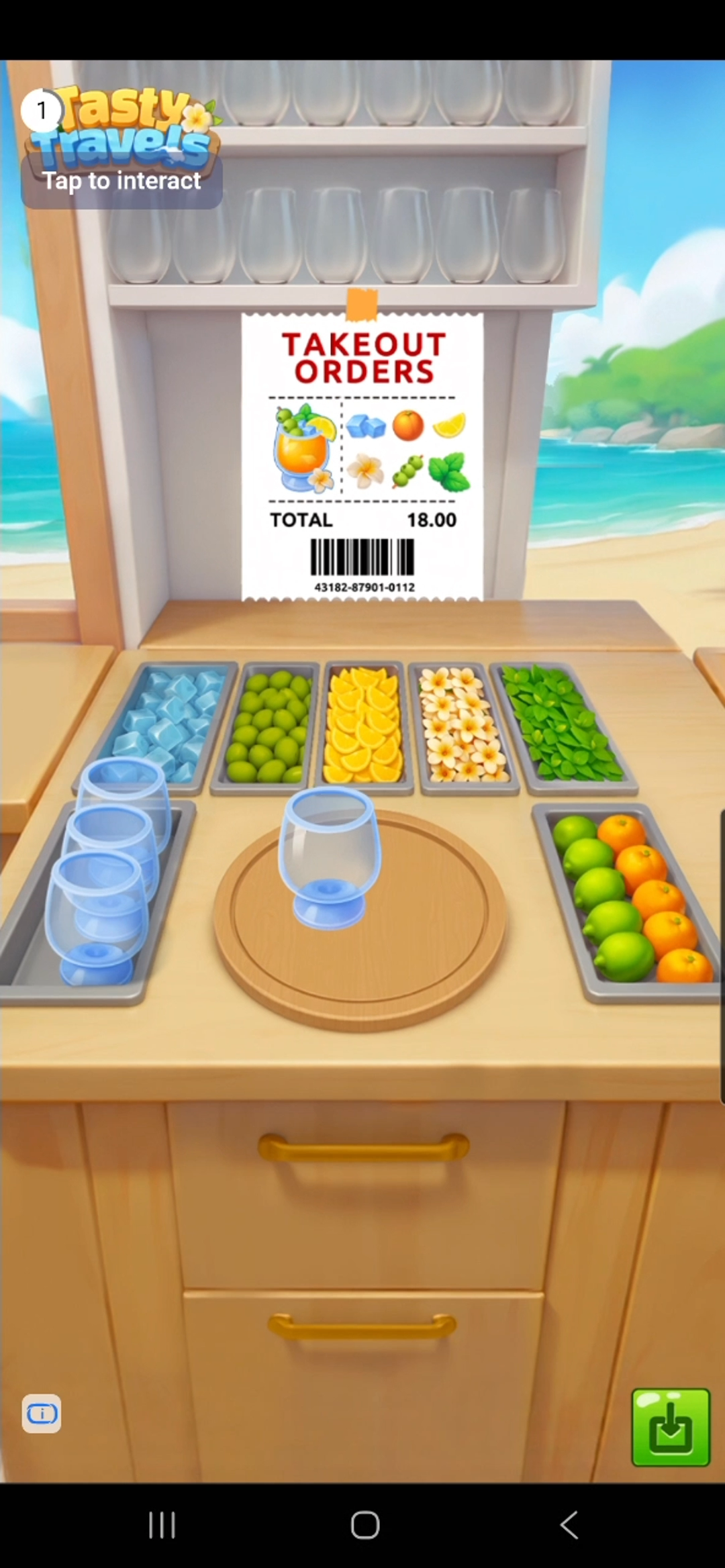
동작 예시

패키지별 구현하기
- react-native-daro
- react-native-daro-m
react-native-daro 1.0.16 이상에서는 인터스티셜 광고를 Hook API로 사용할 수 있습니다. 컴포넌트 내부에서 useInterstitialAd를 사용하면 로딩 상태와 이벤트 콜백을 함께 관리할 수 있습니다.기존의 정적 API(
InterstitialAd.loadAd 등)는 deprecated입니다. 정적 리스너(InterstitialAd.addAdLoadedEventListener 등)는 Hook이나 인스턴스 API로 로드한 광고의 이벤트를 받지 못하니, 광고 로드를 새 API로 옮길 때 이벤트 리스너도 함께 옮겨주세요.import { Button } from "react-native";
import { useInterstitialAd } from "react-native-daro";
function InterstitialAdButton({ adUnitId }) {
const { isLoaded, isLoading, load, show, isAdReady } = useInterstitialAd(
adUnitId,
{
onLoaded: (adInfo) => {
// 광고 로드 성공
},
onLoadFailed: (errorInfo) => {
// 광고 로드 실패
},
onDisplayed: (adInfo) => {
// 광고 노출
},
onHidden: (adInfo) => {
// 광고 닫힘
},
onImpressionRecorded: (adInfo) => {
// 광고 impression 기록
},
}
);
const handlePress = async () => {
if (await isAdReady()) {
show();
return;
}
load();
};
return (
<Button
disabled={isLoading}
title={isLoaded ? "Show Interstitial" : "Load Interstitial"}
onPress={handlePress}
/>
);
}
react-native-daro-m에서는 Static API로 인터스티셜 광고를 구현합니다. InterstitialAd.loadAd(unitId)를 통해서 광고를 로드할 수 있습니다.import { Platform } from "react-native";
import { InterstitialAd } from "react-native-daro-m";
import { AdDisplayFailedInfo, AdInfo, AdLoadFailedInfo, AdRevenueInfo } from "react-native-daro-m";
const INTERSTITIAL_AD_UNIT_ID = Platform.select({
    ios: "YOUR_IOS_INTERSTITIAL_AD_UNIT_ID",
    android: "YOUR_ANDROID_INTERSTITIAL_AD_UNIT_ID",
    default: ''
});

const initializeInterstitialAds = () => {
  InterstitialAd.addAdLoadedEventListener((adInfo: AdInfo) => {...});
  InterstitialAd.addAdLoadFailedEventListener((errorInfo: AdLoadFailedInfo) => {...});
  InterstitialAd.addAdClickedEventListener((adInfo: AdInfo) => { ... });
  InterstitialAd.addAdDisplayedEventListener((adInfo: AdInfo) => { ... });
  InterstitialAd.addAdFailedToDisplayEventListener((adInfo: AdDisplayFailedInfo) => { ... });
  InterstitialAd.addAdHiddenEventListener((adInfo: AdInfo) => { ... });
  InterstitialAd.addAdImpressionRecordedListener((adInfo: AdInfo) => { ... });

  // Load the first interstitial
  loadInterstitial();
}

const loadInterstitial = () => {
  InterstitialAd.loadAd(INTERSTITIAL_AD_UNIT_ID);
}
광고 보여주기
InterstitialAd.showAd(unitId)를 통해서 로드한 광고를 보여줄 수 있습니다.const isInterstitialReady = await InterstitialAd.isAdReady(
INTERSTITIAL_AD_UNIT_ID
);
if (isInterstitialReady) {
InterstitialAd.showAd(INTERSTITIAL_AD_UNIT_ID);
}
구현 예시
`InterstitialAd` 구현 예시입니다.
`InterstitialAd` 구현 예시입니다.
import { useEffect, useRef, useState } from "react";
import { StyleSheet } from "react-native";
// import문은 위의 탭 참조
import { AdDisplayFailedInfo, AdInfo, AdLoadFailedInfo, AdRevenueInfo, InterstitialAd } from "react-native-daro-m";
import { ThemedButton } from "../ThemedButton";

enum AdLoadState {
  notLoaded = 'NOT_LOADED',
  loading = 'LOADING',
  loaded = 'LOADED',
}

type Props = {
  adUnitId: string;
  isInitialized: boolean;
  log: (str: string) => void;
};

const MAX_EXPONENTIAL_RETRY_COUNT = 3;

const InterstitialAdExample = ({ adUnitId, isInitialized, log }: Props) => {
  const [adLoadState, setAdLoadState] = useState<AdLoadState>(AdLoadState.notLoaded);
  const retryAttempt = useRef(0);

  useEffect(() => {
    InterstitialAd.addAdLoadedEventListener((adInfo: AdInfo) => {
      setAdLoadState(AdLoadState.loaded);
      retryAttempt.current = 0;
      log(`Interstitial ad loaded`);
    });

    InterstitialAd.addAdImpressionRecordedListener((adInfo: AdRevenueInfo) => {
      log(`Interstitial ad revenue paid`);
    });

    InterstitialAd.addAdClickedEventListener((adInfo: AdInfo) => {
      log(`Interstitial ad clicked`);
    });

    // Handle ad load failure
    InterstitialAd.addAdLoadFailedEventListener((errorInfo: AdLoadFailedInfo) => {
      setAdLoadState(AdLoadState.notLoaded)

      if (retryAttempt.current > MAX_EXPONENTIAL_RETRY_COUNT) {
        log('Interstitial ad failed to load with code ' + errorInfo.code);
        return;
      }

      // Interstitial ad failed to load
      // We recommend retrying with exponentially higher delays up to a maximum delay (in this case 64 seconds)
      retryAttempt.current += 1;

      const retryDelay = Math.pow(2, Math.min(MAX_EXPONENTIAL_RETRY_COUNT, retryAttempt.current));
      log('Interstitial ad failed to load with code ' + errorInfo.code + ' - retrying in ' + retryDelay + 's');

      setTimeout(() => {
        setAdLoadState(AdLoadState.loading);
        log('Interstitial ad retrying to load...');
        InterstitialAd.loadAd(adUnitId);
      }, retryDelay * 1000);
    });

    InterstitialAd.addAdDisplayedEventListener((adInfo: AdInfo) => {
      log(`Interstitial ad displayed`);
    });

    InterstitialAd.addAdFailedToDisplayEventListener((adInfo: AdDisplayFailedInfo) => {
      setAdLoadState(AdLoadState.notLoaded);
      log(`Interstitial ad failed to display`);
    });

    InterstitialAd.addAdHiddenEventListener((adInfo: AdInfo) => {
      setAdLoadState(AdLoadState.notLoaded);
      log(`Interstitial ad hidden`);
    });

  }, [adUnitId]);

  const getInterstitialButtonTitle = () => {
    if (adLoadState === AdLoadState.notLoaded) {
      return 'Load Interstitial';
    } else if (adLoadState === AdLoadState.loading) {
      return 'Loading...';
    } else {
      return 'Show Interstitial'; // adLoadState.loaded
    }
  };
  return (
    <ThemedButton
      isEnabled={isInitialized && adLoadState !== AdLoadState.loading}
      isLoading={adLoadState === AdLoadState.loading}
      title={getInterstitialButtonTitle()}
      onPress={async () => {
        const isInterstitialReady = await InterstitialAd.isAdReady(adUnitId);
        if (isInterstitialReady) {
          InterstitialAd.showAd(adUnitId);
      } else {
        log('Loading interstitial ad...');
        setAdLoadState(AdLoadState.loading);
        InterstitialAd.loadAd(adUnitId);
      }
    }} />
  );
}

const styles = StyleSheet.create({
  button: {
    margin: 5,
  },
});

export default InterstitialAdExample;