

Before You Begin
SDK Initialization RequiredLoad or render all ad formats only after SDK initialization completes. Rendering ad widgets before initialization will cause ads not to display properly.Applies to all formats: banner, native, interstitial, rewarded, app open, light popup.
The Daro Flutter SDK currently supports Non-reward apps only.
Requirements
- Flutter SDK ^3.24.0
- Dart ^3.5.0
- Android minSdkVersion: 24
- iOS 13.0 or higher
Verify app-ads.txt settings before proceeding.
App Setup
Add Package
Adddaro_flutter to your pubspec.yaml:
dependencies:
  daro_flutter: ^1.0.7
flutter pub get
Automatic setup (1.0.7 and later)
Createdaro.yaml in your app root using the example in the package README. Specify each platform’s App Key and existing key file path, plus the iOS AdMob App ID. Apply and check native settings with:
dart run daro_flutter:configure
dart run daro_flutter:doctor
doctor does not replace building the app and verifying SDK initialization.
Android Project Setup
- Android minSdkVersion: 24
Desugaring required: Configure desugaring if minSdk is below 26.
android {
    ...

    compileOptions {
        isCoreLibraryDesugaringEnabled = true
        sourceCompatibility = JavaVersion.VERSION_1_8
        targetCompatibility = JavaVersion.VERSION_1_8
    }

    ...
}

...

dependencies {
    ...

    coreLibraryDesugaring("com.android.tools:desugar_jdk_libs:2.0.4")

    ...
}
android {
    ...

    compileOptions {
        coreLibraryDesugaringEnabled true
        sourceCompatibility JavaVersion.VERSION_1_8
        targetCompatibility JavaVersion.VERSION_1_8
    }

    ...
}

...

dependencies {
    ...

    coreLibraryDesugaring 'com.android.tools:desugar_jdk_libs:2.0.4'

    ...
}
Android Project Setup
Android Project Setup
1
Project-level Build Configuration
- Add maven repositories to the
allprojectsblock in thebuild.gradle(root)file.
allprojects {
    repositories {
        google()
        mavenCentral()
        maven { url = uri("https://artifact.bytedance.com/repository/pangle") }
        maven { url = uri("https://verve.jfrog.io/artifactory/verve-gradle-release") }
        maven { url = uri("https://cboost.jfrog.io/artifactory/chartboost-ads/") }
        maven { url = uri("https://repo.premiumads.net/artifactory/mobile-ads-sdk/") }
        maven { url = uri("https://repo.pubmatic.com/artifactory/public-repos") }
        maven { url = uri("https://s3.amazonaws.com/smaato-sdk-releases/") }
        maven { url = uri("https://android-sdk.is.com/") }
        maven { url = uri("https://dl-maven-android.mintegral.com/repository/mbridge_android_sdk_oversea") }
    }
}
allprojects {
    repositories {
        google()
        mavenCentral()
        maven { url 'https://artifact.bytedance.com/repository/pangle' }
        maven { url 'https://verve.jfrog.io/artifactory/verve-gradle-release' }
        maven { url 'https://cboost.jfrog.io/artifactory/chartboost-ads/' }
        maven { url 'https://repo.premiumads.net/artifactory/mobile-ads-sdk/' }
        maven { url 'https://repo.pubmatic.com/artifactory/public-repos' }
        maven { url 'https://s3.amazonaws.com/smaato-sdk-releases/' }
        maven { url 'https://android-sdk.is.com/' }
        maven { url 'https://dl-maven-android.mintegral.com/repository/mbridge_android_sdk_oversea' }
    }
}
2
Add the DARO plugin to build.gradle(root)
- Add the DARO plugin to the
build.gradle(root)file.
Latest version
- daro-plugin: 1.0.13
buildscript {
    repositories {
        google()
        mavenCentral()
    }
    dependencies {
        classpath("so.daro:daro-plugin:1.0.13")
    }
}
buildscript {
    repositories {
        google()
        mavenCentral()
    }
    dependencies {
        classpath 'so.daro:daro-plugin:1.0.13'
    }
}
3
Add Daro SDK
- Add the Daro SDK to
android/app/build.gradle.
Latest version
- daro-a: 1.4.2
dependencies {
    ...
    implementation("so.daro:daro-a:1.4.2")
    ...
}
dependencies {
    ...
    implementation 'so.daro:daro-a:1.4.2'
    ...
}
4
Add android-daro-key.txt file
- Add the
android-daro-key.txtfile.
- General
- If you need flavor/buildType separation
android/app/
└── android-daro-key.txt
android/app/
└── src/
    ├── EnvA/
    │   └── android-daro-key.txt
    └── EnvB/
        └── android-daro-key.txt
android-daro-key.txt can be downloaded from the DARO dashboard.5
Configure daroAppKey
- Configure the daroAppKey.
- General
- If you need flavor/buildType separation
Show Configure in gradle.properties
Show Configure in gradle.properties
android.useAndroidX=true
android.enableJetifier=true
daroAppKey={APP_KEY}
Show Configure directly in app module gradle
Show Configure directly in app module gradle
Configure the following in the app module build.gradle.
buildscript{
    extra["daroAppKey"] = "APP_KEY"
}
buildscript {
    ext.daroAppKey = "APP_KEY"
}
Show Configure in gradle.properties
Show Configure in gradle.properties
android.useAndroidX=true
android.enableJetifier=true
daroAppKey.EnvA={APP_KEY}
daroAppKey.EnvB={APP_KEY}
Show Configure directly in app module gradle
Show Configure directly in app module gradle
Configure the following in the app module build.gradle.
buildscript{
    extra["daroAppKey.EnvA"] = "APP_KEY"
    extra["daroAppKey.EnvB"] = "APP_KEY"
}
buildscript {
    ext.daroAppKey.EnvA = "APP_KEY"
    ext.daroAppKey.EnvB = "APP_KEY"
}
Please capitalize the first letter of Flavor
The daroAppKey can be found in the DARO dashboard.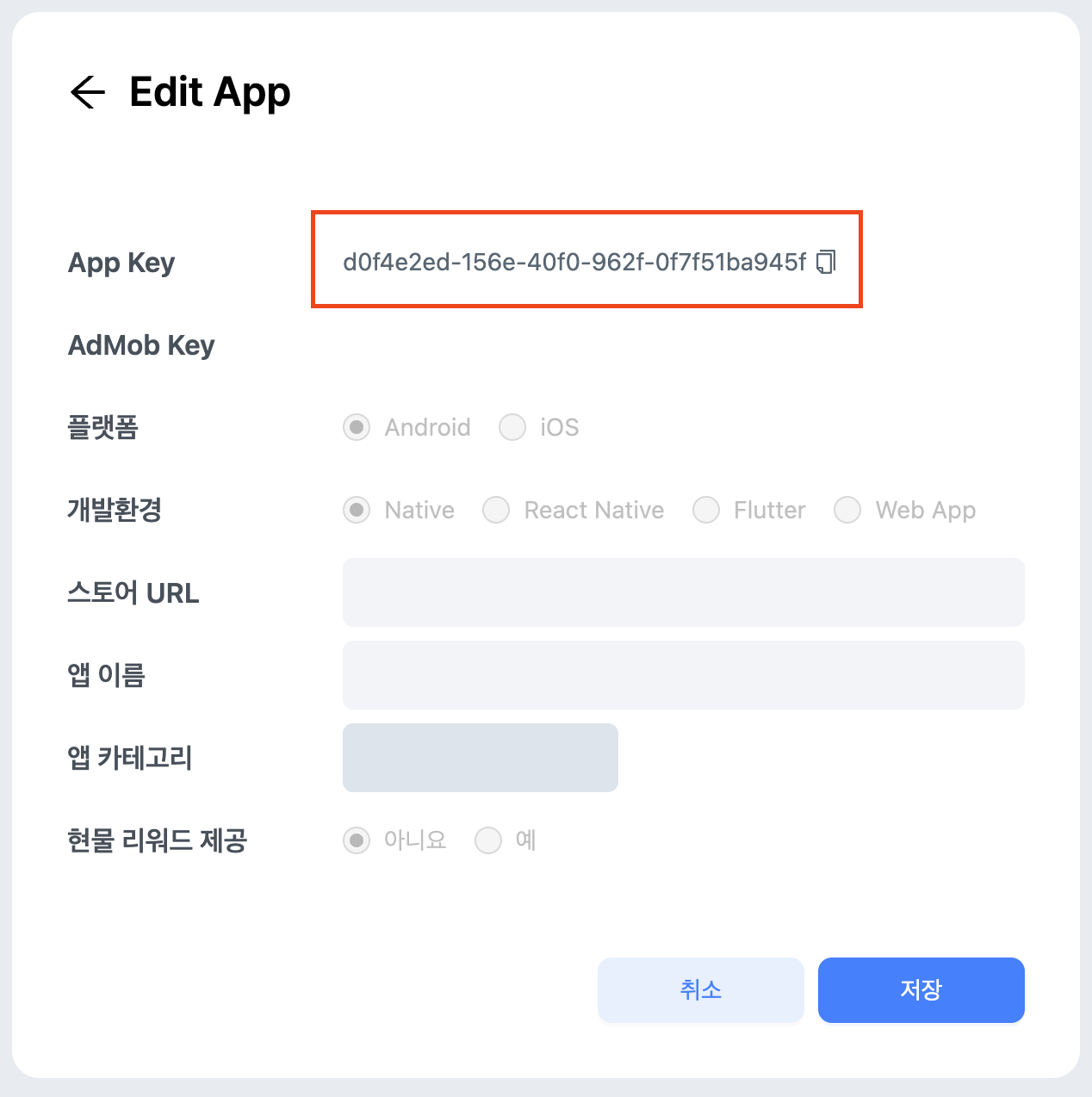
6
Apply the DARO plugin in build.gradle(app)
- Apply the DARO plugin in
build.gradle(app).
plugins {
    ...
    id("so.daro.a")
    ...
}
plugins {
    ...
    id 'so.daro.a'
    ...
}
iOS Project Setup
- iOS 13.0 or higher
- Xcode 14.0 or higher
iOS Project Setup
iOS Project Setup
1
Install Pods
- Run pod install in the
ios/directory of your Flutter project.
cd ios && pod install
2
Add ios-daro-key.txt file
- Open
ios/Runner.xcworkspaceand add theios-daro-key.txtfile by drag and drop.
The
ios-daro-key.txt file must be included in the project to initialize the SDK.ios-daro-key.txt can be downloaded from the DARO dashboard.3
Info.plist Configuration
- Add the following IDs to
Info.plist.
GADApplicationIdentifier, DaroAppKey can be found in the DARO dashboard (AdMob Key, App Key).❗ Please copy the
SKAdNetworkItems from Info.plist to your app’s Info.plist. If not registered, ad networks cannot receive conversion performance reports, which will reduce advertising efficiency. This has a significant impact on ad performance, so please add it!<key>GADApplicationIdentifier</key>
<string> /* Add the Admob Key issued from the DARO dashboard */ </string>
<key>DaroAppKey</key>
<string> /* Add the Daro App Key issued from the DARO dashboard */ </string>
<key>SKAdNetworkItems</key>
<array>
<dict>
<key>SKAdNetworkIdentifier</key>
<string>cstr6suwn9.skadnetwork</string>
</dict>
<dict>
<key>SKAdNetworkIdentifier</key>
<string>4fzdc2evr5.skadnetwork</string>
</dict>
<dict>
<key>SKAdNetworkIdentifier</key>
<string>4pfyvq9l8r.skadnetwork</string>
</dict>
<dict>
<key>SKAdNetworkIdentifier</key>
<string>2fnua5tdw4.skadnetwork</string>
</dict>
<dict>
<key>SKAdNetworkIdentifier</key>
<string>ydx93a7ass.skadnetwork</string>
</dict>
<dict>
<key>SKAdNetworkIdentifier</key>
<string>5a6flpkh64.skadnetwork</string>
</dict>
<dict>
<key>SKAdNetworkIdentifier</key>
<string>p78axxw29g.skadnetwork</string>
</dict>
<dict>
<key>SKAdNetworkIdentifier</key>
<string>v72qych5uu.skadnetwork</string>
</dict>
<dict>
<key>SKAdNetworkIdentifier</key>
<string>ludvb6z3bs.skadnetwork</string>
</dict>
<dict>
<key>SKAdNetworkIdentifier</key>
<string>cp8zw746q7.skadnetwork</string>
</dict>
<dict>
<key>SKAdNetworkIdentifier</key>
<string>3sh42y64q3.skadnetwork</string>
</dict>
<dict>
<key>SKAdNetworkIdentifier</key>
<string>c6k4g5qg8m.skadnetwork</string>
</dict>
<dict>
<key>SKAdNetworkIdentifier</key>
<string>s39g8k73mm.skadnetwork</string>
</dict>
<dict>
<key>SKAdNetworkIdentifier</key>
<string>3qy4746246.skadnetwork</string>
</dict>
<dict>
<key>SKAdNetworkIdentifier</key>
<string>f38h382jlk.skadnetwork</string>
</dict>
<dict>
<key>SKAdNetworkIdentifier</key>
<string>hs6bdukanm.skadnetwork</string>
</dict>
<dict>
<key>SKAdNetworkIdentifier</key>
<string>v4nxqhlyqp.skadnetwork</string>
</dict>
<dict>
<key>SKAdNetworkIdentifier</key>
<string>wzmmz9fp6w.skadnetwork</string>
</dict>
<dict>
<key>SKAdNetworkIdentifier</key>
<string>yclnxrl5pm.skadnetwork</string>
</dict>
<dict>
<key>SKAdNetworkIdentifier</key>
<string>t38b2kh725.skadnetwork</string>
</dict>
<dict>
<key>SKAdNetworkIdentifier</key>
<string>7ug5zh24hu.skadnetwork</string>
</dict>
<dict>
<key>SKAdNetworkIdentifier</key>
<string>gta9lk7p23.skadnetwork</string>
</dict>
<dict>
<key>SKAdNetworkIdentifier</key>
<string>vutu7akeur.skadnetwork</string>
</dict>
<dict>
<key>SKAdNetworkIdentifier</key>
<string>y5ghdn5j9k.skadnetwork</string>
</dict>
<dict>
<key>SKAdNetworkIdentifier</key>
<string>n6fk4nfna4.skadnetwork</string>
</dict>
<dict>
<key>SKAdNetworkIdentifier</key>
<string>v9wttpbfk9.skadnetwork</string>
</dict>
<dict>
<key>SKAdNetworkIdentifier</key>
<string>n38lu8286q.skadnetwork</string>
</dict>
<dict>
<key>SKAdNetworkIdentifier</key>
<string>47vhws6wlr.skadnetwork</string>
</dict>
<dict>
<key>SKAdNetworkIdentifier</key>
<string>kbd757ywx3.skadnetwork</string>
</dict>
<dict>
<key>SKAdNetworkIdentifier</key>
<string>9t245vhmpl.skadnetwork</string>
</dict>
<dict>
<key>SKAdNetworkIdentifier</key>
<string>eh6m2bh4zr.skadnetwork</string>
</dict>
<dict>
<key>SKAdNetworkIdentifier</key>
<string>a2p9lx4jpn.skadnetwork</string>
</dict>
<dict>
<key>SKAdNetworkIdentifier</key>
<string>22mmun2rn5.skadnetwork</string>
</dict>
<dict>
<key>SKAdNetworkIdentifier</key>
<string>4468km3ulz.skadnetwork</string>
</dict>
<dict>
<key>SKAdNetworkIdentifier</key>
<string>2u9pt9hc89.skadnetwork</string>
</dict>
<dict>
<key>SKAdNetworkIdentifier</key>
<string>8s468mfl3y.skadnetwork</string>
</dict>
<dict>
<key>SKAdNetworkIdentifier</key>
<string>klf5c3l5u5.skadnetwork</string>
</dict>
<dict>
<key>SKAdNetworkIdentifier</key>
<string>ppxm28t8ap.skadnetwork</string>
</dict>
<dict>
<key>SKAdNetworkIdentifier</key>
<string>ecpz2srf59.skadnetwork</string>
</dict>
<dict>
<key>SKAdNetworkIdentifier</key>
<string>uw77j35x4d.skadnetwork</string>
</dict>
<dict>
<key>SKAdNetworkIdentifier</key>
<string>pwa73g5rt2.skadnetwork</string>
</dict>
<dict>
<key>SKAdNetworkIdentifier</key>
<string>mlmmfzh3r3.skadnetwork</string>
</dict>
<dict>
<key>SKAdNetworkIdentifier</key>
<string>578prtvx9j.skadnetwork</string>
</dict>
<dict>
<key>SKAdNetworkIdentifier</key>
<string>4dzt52r2t5.skadnetwork</string>
</dict>
<dict>
<key>SKAdNetworkIdentifier</key>
<string>e5fvkxwrpn.skadnetwork</string>
</dict>
<dict>
<key>SKAdNetworkIdentifier</key>
<string>8c4e2ghe7u.skadnetwork</string>
</dict>
<dict>
<key>SKAdNetworkIdentifier</key>
<string>zq492l623r.skadnetwork</string>
</dict>
<dict>
<key>SKAdNetworkIdentifier</key>
<string>3rd42ekr43.skadnetwork</string>
</dict>
<dict>
<key>SKAdNetworkIdentifier</key>
<string>3qcr597p9d.skadnetwork</string>
</dict>
<dict>
<key>SKAdNetworkIdentifier</key>
<string>mj797d8u6f.skadnetwork</string>
</dict>
<dict>
<key>SKAdNetworkIdentifier</key>
<string>55644vm79v.skadnetwork</string>
</dict>
<dict>
<key>SKAdNetworkIdentifier</key>
<string>6yxyv74ff7.skadnetwork</string>
</dict>
<dict>
<key>SKAdNetworkIdentifier</key>
<string>55y65gfgn7.skadnetwork</string>
</dict>
<dict>
<key>SKAdNetworkIdentifier</key>
<string>cwn433xbcr.skadnetwork</string>
</dict>
<dict>
<key>SKAdNetworkIdentifier</key>
<string>nu4557a4je.skadnetwork</string>
</dict>
<dict>
<key>SKAdNetworkIdentifier</key>
<string>w7jznl3r6g.skadnetwork</string>
</dict>
<dict>
<key>SKAdNetworkIdentifier</key>
<string>577p5t736z.skadnetwork</string>
</dict>
<dict>
<key>SKAdNetworkIdentifier</key>
<string>6rd35atwn8.skadnetwork</string>
</dict>
<dict>
<key>SKAdNetworkIdentifier</key>
<string>7bxrt786m8.skadnetwork</string>
</dict>
<dict>
<key>SKAdNetworkIdentifier</key>
<string>7fbxrn65az.skadnetwork</string>
</dict>
<dict>
<key>SKAdNetworkIdentifier</key>
<string>dt3cjx1a9i.skadnetwork</string>
</dict>
<dict>
<key>SKAdNetworkIdentifier</key>
<string>fz2k2k5tej.skadnetwork</string>
</dict>
<dict>
<key>SKAdNetworkIdentifier</key>
<string>jk2fsx2rgz.skadnetwork</string>
</dict>
<dict>
<key>SKAdNetworkIdentifier</key>
<string>r8lj5b58b5.skadnetwork</string>
</dict>
<dict>
<key>SKAdNetworkIdentifier</key>
<string>tmhh9296z4.skadnetwork</string>
</dict>
<dict>
<key>SKAdNetworkIdentifier</key>
<string>k6y4y55b64.skadnetwork</string>
</dict>
<dict>
<key>SKAdNetworkIdentifier</key>
<string>qwpu75vrh2.skadnetwork</string>
</dict>
<dict>
<key>SKAdNetworkIdentifier</key>
<string>238da6jt44.skadnetwork</string>
</dict>
<dict>
<key>SKAdNetworkIdentifier</key>
<string>24t9a8vw3c.skadnetwork</string>
</dict>
<dict>
<key>SKAdNetworkIdentifier</key>
<string>24zw6aqk47.skadnetwork</string>
</dict>
<dict>
<key>SKAdNetworkIdentifier</key>
<string>252b5q8x7y.skadnetwork</string>
</dict>
<dict>
<key>SKAdNetworkIdentifier</key>
<string>275upjj5gd.skadnetwork</string>
</dict>
<dict>
<key>SKAdNetworkIdentifier</key>
<string>294l99pt4k.skadnetwork</string>
</dict>
<dict>
<key>SKAdNetworkIdentifier</key>
<string>32z4fx6l9h.skadnetwork</string>
</dict>
<dict>
<key>SKAdNetworkIdentifier</key>
<string>3l6bd9hu43.skadnetwork</string>
</dict>
<dict>
<key>SKAdNetworkIdentifier</key>
<string>424m5254lk.skadnetwork</string>
</dict>
<dict>
<key>SKAdNetworkIdentifier</key>
<string>44jx6755aq.skadnetwork</string>
</dict>
<dict>
<key>SKAdNetworkIdentifier</key>
<string>44n7hlldy6.skadnetwork</string>
</dict>
<dict>
<key>SKAdNetworkIdentifier</key>
<string>488r3q3dtq.skadnetwork</string>
</dict>
<dict>
<key>SKAdNetworkIdentifier</key>
<string>4mn522wn87.skadnetwork</string>
</dict>
<dict>
<key>SKAdNetworkIdentifier</key>
<string>4w7y6s5ca2.skadnetwork</string>
</dict>
<dict>
<key>SKAdNetworkIdentifier</key>
<string>523jb4fst2.skadnetwork</string>
</dict>
<dict>
<key>SKAdNetworkIdentifier</key>
<string>52fl2v3hgk.skadnetwork</string>
</dict>
<dict>
<key>SKAdNetworkIdentifier</key>
<string>54nzkqm89y.skadnetwork</string>
</dict>
<dict>
<key>SKAdNetworkIdentifier</key>
<string>5f5u5tfb26.skadnetwork</string>
</dict>
<dict>
<key>SKAdNetworkIdentifier</key>
<string>5l3tpt7t6e.skadnetwork</string>
</dict>
<dict>
<key>SKAdNetworkIdentifier</key>
<string>5lm9lj6jb7.skadnetwork</string>
</dict>
<dict>
<key>SKAdNetworkIdentifier</key>
<string>5tjdwbrq8w.skadnetwork</string>
</dict>
<dict>
<key>SKAdNetworkIdentifier</key>
<string>6964rsfnh4.skadnetwork</string>
</dict>
<dict>
<key>SKAdNetworkIdentifier</key>
<string>6g9af3uyq4.skadnetwork</string>
</dict>
<dict>
<key>SKAdNetworkIdentifier</key>
<string>6p4ks3rnbw.skadnetwork</string>
</dict>
<dict>
<key>SKAdNetworkIdentifier</key>
<string>6v7lgmsu45.skadnetwork</string>
</dict>
<dict>
<key>SKAdNetworkIdentifier</key>
<string>6xzpu9s2p8.skadnetwork</string>
</dict>
<dict>
<key>SKAdNetworkIdentifier</key>
<string>737z793b9f.skadnetwork</string>
</dict>
<dict>
<key>SKAdNetworkIdentifier</key>
<string>74b6s63p6l.skadnetwork</string>
</dict>
<dict>
<key>SKAdNetworkIdentifier</key>
<string>77y3x8wds4.skadnetwork</string>
</dict>
<dict>
<key>SKAdNetworkIdentifier</key>
<string>7953jerfzd.skadnetwork</string>
</dict>
<dict>
<key>SKAdNetworkIdentifier</key>
<string>79pbpufp6p.skadnetwork</string>
</dict>
<dict>
<key>SKAdNetworkIdentifier</key>
<string>7fmhfwg9en.skadnetwork</string>
</dict>
<dict>
<key>SKAdNetworkIdentifier</key>
<string>7rz58n8ntl.skadnetwork</string>
</dict>
<dict>
<key>SKAdNetworkIdentifier</key>
<string>84993kbrcf.skadnetwork</string>
</dict>
<dict>
<key>SKAdNetworkIdentifier</key>
<string>87u5trcl3r.skadnetwork</string>
</dict>
<dict>
<key>SKAdNetworkIdentifier</key>
<string>89z7zv988g.skadnetwork</string>
</dict>
<dict>
<key>SKAdNetworkIdentifier</key>
<string>8m87ys6875.skadnetwork</string>
</dict>
<dict>
<key>SKAdNetworkIdentifier</key>
<string>8r8llnkz5a.skadnetwork</string>
</dict>
<dict>
<key>SKAdNetworkIdentifier</key>
<string>97r2b46745.skadnetwork</string>
</dict>
<dict>
<key>SKAdNetworkIdentifier</key>
<string>9b89h5y424.skadnetwork</string>
</dict>
<dict>
<key>SKAdNetworkIdentifier</key>
<string>9g2aggbj52.skadnetwork</string>
</dict>
<dict>
<key>SKAdNetworkIdentifier</key>
<string>9nlqeag3gk.skadnetwork</string>
</dict>
<dict>
<key>SKAdNetworkIdentifier</key>
<string>9rd848q2bz.skadnetwork</string>
</dict>
<dict>
<key>SKAdNetworkIdentifier</key>
<string>9vvzujtq5s.skadnetwork</string>
</dict>
<dict>
<key>SKAdNetworkIdentifier</key>
<string>9yg77x724h.skadnetwork</string>
</dict>
<dict>
<key>SKAdNetworkIdentifier</key>
<string>a7xqa6mtl2.skadnetwork</string>
</dict>
<dict>
<key>SKAdNetworkIdentifier</key>
<string>a8cz6cu7e5.skadnetwork</string>
</dict>
<dict>
<key>SKAdNetworkIdentifier</key>
<string>apzhy3va96.skadnetwork</string>
</dict>
<dict>
<key>SKAdNetworkIdentifier</key>
<string>av6w8kgt66.skadnetwork</string>
</dict>
<dict>
<key>SKAdNetworkIdentifier</key>
<string>b9bk5wbcq9.skadnetwork</string>
</dict>
<dict>
<key>SKAdNetworkIdentifier</key>
<string>bvpn9ufa9b.skadnetwork</string>
</dict>
<dict>
<key>SKAdNetworkIdentifier</key>
<string>bxvub5ada5.skadnetwork</string>
</dict>
<dict>
<key>SKAdNetworkIdentifier</key>
<string>c3frkrj4fj.skadnetwork</string>
</dict>
<dict>
<key>SKAdNetworkIdentifier</key>
<string>ce8ybjwass.skadnetwork</string>
</dict>
<dict>
<key>SKAdNetworkIdentifier</key>
<string>cg4yq2srnc.skadnetwork</string>
</dict>
<dict>
<key>SKAdNetworkIdentifier</key>
<string>cj5566h2ga.skadnetwork</string>
</dict>
<dict>
<key>SKAdNetworkIdentifier</key>
<string>cs644xg564.skadnetwork</string>
</dict>
<dict>
<key>SKAdNetworkIdentifier</key>
<string>dbu4b84rxf.skadnetwork</string>
</dict>
<dict>
<key>SKAdNetworkIdentifier</key>
<string>dkc879ngq3.skadnetwork</string>
</dict>
<dict>
<key>SKAdNetworkIdentifier</key>
<string>dzg6xy7pwj.skadnetwork</string>
</dict>
<dict>
<key>SKAdNetworkIdentifier</key>
<string>ejvt5qm6ak.skadnetwork</string>
</dict>
<dict>
<key>SKAdNetworkIdentifier</key>
<string>f2zub97jtl.skadnetwork</string>
</dict>
<dict>
<key>SKAdNetworkIdentifier</key>
<string>f73kdq92p3.skadnetwork</string>
</dict>
<dict>
<key>SKAdNetworkIdentifier</key>
<string>f7s53z58qe.skadnetwork</string>
</dict>
<dict>
<key>SKAdNetworkIdentifier</key>
<string>feyaarzu9v.skadnetwork</string>
</dict>
<dict>
<key>SKAdNetworkIdentifier</key>
<string>fq6vru337s.skadnetwork</string>
</dict>
<dict>
<key>SKAdNetworkIdentifier</key>
<string>g28c52eehv.skadnetwork</string>
</dict>
<dict>
<key>SKAdNetworkIdentifier</key>
<string>g2y4y55b64.skadnetwork</string>
</dict>
<dict>
<key>SKAdNetworkIdentifier</key>
<string>g6gcrrvk4p.skadnetwork</string>
</dict>
<dict>
<key>SKAdNetworkIdentifier</key>
<string>ggvn48r87g.skadnetwork</string>
</dict>
<dict>
<key>SKAdNetworkIdentifier</key>
<string>glqzh8vgby.skadnetwork</string>
</dict>
<dict>
<key>SKAdNetworkIdentifier</key>
<string>gta8lk7p23.skadnetwork</string>
</dict>
<dict>
<key>SKAdNetworkIdentifier</key>
<string>gvmwg8q7h5.skadnetwork</string>
</dict>
<dict>
<key>SKAdNetworkIdentifier</key>
<string>h65wbv5k3f.skadnetwork</string>
</dict>
<dict>
<key>SKAdNetworkIdentifier</key>
<string>hb56zgv37p.skadnetwork</string>
</dict>
<dict>
<key>SKAdNetworkIdentifier</key>
<string>hdw39hrw9y.skadnetwork</string>
</dict>
<dict>
<key>SKAdNetworkIdentifier</key>
<string>hjevpa356n.skadnetwork</string>
</dict>
<dict>
<key>SKAdNetworkIdentifier</key>
<string>k674qkevps.skadnetwork</string>
</dict>
<dict>
<key>SKAdNetworkIdentifier</key>
<string>kbmxgpxpgc.skadnetwork</string>
</dict>
<dict>
<key>SKAdNetworkIdentifier</key>
<string>krvm3zuq6h.skadnetwork</string>
</dict>
<dict>
<key>SKAdNetworkIdentifier</key>
<string>ln5gz23vtd.skadnetwork</string>
</dict>
<dict>
<key>SKAdNetworkIdentifier</key>
<string>lr83yxwka7.skadnetwork</string>
</dict>
<dict>
<key>SKAdNetworkIdentifier</key>
<string>m297p6643m.skadnetwork</string>
</dict>
<dict>
<key>SKAdNetworkIdentifier</key>
<string>m5mvw97r93.skadnetwork</string>
</dict>
<dict>
<key>SKAdNetworkIdentifier</key>
<string>m8dbw4sv7c.skadnetwork</string>
</dict>
<dict>
<key>SKAdNetworkIdentifier</key>
<string>mls7yz5dvl.skadnetwork</string>
</dict>
<dict>
<key>SKAdNetworkIdentifier</key>
<string>mp6xlyr22a.skadnetwork</string>
</dict>
<dict>
<key>SKAdNetworkIdentifier</key>
<string>mqn7fxpca7.skadnetwork</string>
</dict>
<dict>
<key>SKAdNetworkIdentifier</key>
<string>mtkv5xtk9e.skadnetwork</string>
</dict>
<dict>
<key>SKAdNetworkIdentifier</key>
<string>n66cz3y3bx.skadnetwork</string>
</dict>
<dict>
<key>SKAdNetworkIdentifier</key>
<string>n9x2a789qt.skadnetwork</string>
</dict>
<dict>
<key>SKAdNetworkIdentifier</key>
<string>ns5j362hk7.skadnetwork</string>
</dict>
<dict>
<key>SKAdNetworkIdentifier</key>
<string>nzq8sh4pbs.skadnetwork</string>
</dict>
<dict>
<key>SKAdNetworkIdentifier</key>
<string>p4ybsjem3u.skadnetwork</string>
</dict>
<dict>
<key>SKAdNetworkIdentifier</key>
<string>prcb7njmu6.skadnetwork</string>
</dict>
<dict>
<key>SKAdNetworkIdentifier</key>
<string>pu4na253f3.skadnetwork</string>
</dict>
<dict>
<key>SKAdNetworkIdentifier</key>
<string>pwdxu55a5a.skadnetwork</string>
</dict>
<dict>
<key>SKAdNetworkIdentifier</key>
<string>qqp299437r.skadnetwork</string>
</dict>
<dict>
<key>SKAdNetworkIdentifier</key>
<string>qu637u8glc.skadnetwork</string>
</dict>
<dict>
<key>SKAdNetworkIdentifier</key>
<string>r45fhb6rf7.skadnetwork</string>
</dict>
<dict>
<key>SKAdNetworkIdentifier</key>
<string>rvh3l7un93.skadnetwork</string>
</dict>
<dict>
<key>SKAdNetworkIdentifier</key>
<string>rx5hdcabgc.skadnetwork</string>
</dict>
<dict>
<key>SKAdNetworkIdentifier</key>
<string>s69wq72ugq.skadnetwork</string>
</dict>
<dict>
<key>SKAdNetworkIdentifier</key>
<string>sczv5946wb.skadnetwork</string>
</dict>
<dict>
<key>SKAdNetworkIdentifier</key>
<string>su67r6k2v3.skadnetwork</string>
</dict>
<dict>
<key>SKAdNetworkIdentifier</key>
<string>t6d3zquu66.skadnetwork</string>
</dict>
<dict>
<key>SKAdNetworkIdentifier</key>
<string>tl55sbb4fm.skadnetwork</string>
</dict>
<dict>
<key>SKAdNetworkIdentifier</key>
<string>tvvz7th9br.skadnetwork</string>
</dict>
<dict>
<key>SKAdNetworkIdentifier</key>
<string>u679fj5vs4.skadnetwork</string>
</dict>
<dict>
<key>SKAdNetworkIdentifier</key>
<string>v79kvwwj4g.skadnetwork</string>
</dict>
<dict>
<key>SKAdNetworkIdentifier</key>
<string>vcra2ehyfk.skadnetwork</string>
</dict>
<dict>
<key>SKAdNetworkIdentifier</key>
<string>vhf287vqwu.skadnetwork</string>
</dict>
<dict>
<key>SKAdNetworkIdentifier</key>
<string>w9q455wk68.skadnetwork</string>
</dict>
<dict>
<key>SKAdNetworkIdentifier</key>
<string>wg4vff78zm.skadnetwork</string>
</dict>
<dict>
<key>SKAdNetworkIdentifier</key>
<string>x2jnk7ly8j.skadnetwork</string>
</dict>
<dict>
<key>SKAdNetworkIdentifier</key>
<string>x44k69ngh6.skadnetwork</string>
</dict>
<dict>
<key>SKAdNetworkIdentifier</key>
<string>x5l83yy675.skadnetwork</string>
</dict>
<dict>
<key>SKAdNetworkIdentifier</key>
<string>x8jxxk4ff5.skadnetwork</string>
</dict>
<dict>
<key>SKAdNetworkIdentifier</key>
<string>x8uqf25wch.skadnetwork</string>
</dict>
<dict>
<key>SKAdNetworkIdentifier</key>
<string>x8yj322td6.skadnetwork</string>
</dict>
<dict>
<key>SKAdNetworkIdentifier</key>
<string>xga6mpmplv.skadnetwork</string>
</dict>
<dict>
<key>SKAdNetworkIdentifier</key>
<string>xy9t38ct57.skadnetwork</string>
</dict>
<dict>
<key>SKAdNetworkIdentifier</key>
<string>y45688jllp.skadnetwork</string>
</dict>
<dict>
<key>SKAdNetworkIdentifier</key>
<string>yrqqpx2mcb.skadnetwork</string>
</dict>
<dict>
<key>SKAdNetworkIdentifier</key>
<string>z24wtl6j62.skadnetwork</string>
</dict>
<dict>
<key>SKAdNetworkIdentifier</key>
<string>z4gj7hsk7h.skadnetwork</string>
</dict>
<dict>
<key>SKAdNetworkIdentifier</key>
<string>z959bm4gru.skadnetwork</string>
</dict>
<dict>
<key>SKAdNetworkIdentifier</key>
<string>zmmz9fp6w.skadnetwork</string>
</dict>
<dict>
<key>SKAdNetworkIdentifier</key>
<string>zmvfpc5aq8.skadnetwork</string>
</dict>
</array>
Initialize SDK
Initialize the SDK using the code below:import 'package:daro_flutter/daro_flutter.dart';
void main() async {
WidgetsFlutterBinding.ensureInitialized();
// Enable debug mode (for testing before release)
DaroFlutter.isDebugMode = true;
// Initialize SDK
await DaroFlutter.initialize();
runApp(const MyApp());
}
Best Practices
SDK Initialization Management
Recommended practices to manage SDK efficiently and prevent errors.- Call
initialize()in themain()function- Initialize at the app entry point in the
main()function
- Initialize at the app entry point in the
- Render ads after initialization completes
- Render ad widgets only after
await DaroFlutter.initialize()completes
- Render ad widgets only after
- Display banner and native ad widgets after initialization
- Ensure ad widgets don’t render before initialization completes